
Bluedriver Pro Obdii Scan Tool Review
Navigating the complex world of automotive diagnostics can be a daunting task for both seasoned mechanics and everyday car owners. The constant worry about that illuminated check engine light, or the mystery behind unusual dashboard indicators, often leads to expensive trips to the repair shop. However, advancements in technology have brought powerful diagnostic tools directly into the hands of consumers. The BlueDriver Bluetooth Pro OBDII Scan Tool stands out as a prime example, offering a sophisticated yet user-friendly solution for understanding your vehicle’s health. This device promises to demystify car problems, providing detailed insights and actionable information without the need for costly subscriptions or complicated interfaces. Its ability to connect seamlessly with smartphones and tablets makes it an accessible and indispensable tool for anyone looking to take control of their vehicle maintenance.
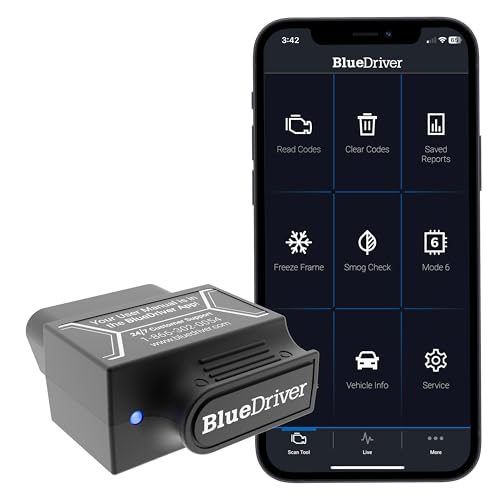
The BlueDriver Pro is engineered to bridge the gap between professional-grade diagnostics and DIY accessibility. It leverages Bluetooth technology to communicate wirelessly with your iPhone or Android device, transforming it into a powerful diagnostic computer. This eliminates the need for cumbersome wires and dedicated handheld units, offering unparalleled convenience. The accompanying app is the heart of the system, providing a clean and intuitive interface that guides users through the diagnostic process. Whether you’re dealing with a minor glitch or a more significant issue, the BlueDriver Pro aims to equip you with the knowledge to make informed decisions about your vehicle’s care. Its comprehensive capabilities extend beyond just reading error codes, offering a deeper understanding of your car’s systems.
| Connectivity | Bluetooth |
| Compatibility | iPhone & Android devices |
| Vehicle Coverage | 1996 and newer vehicles |
| Supported Systems | Engine, ABS, SRS, Airbag, and 7000+ issues |
| Subscription Fee | None |
| Dimensions | Compact, portable design |
| Material | Durable plastic casing |
Unlocking Vehicle Insights with Advanced Diagnostics
The BlueDriver Bluetooth Pro OBDII Scan Tool excels in its ability to provide a comprehensive diagnostic experience that rivals professional equipment, all without recurring fees. It connects to your vehicle’s OBDII port and transmits data wirelessly to a smartphone or tablet via a dedicated app. This app is the gateway to understanding a vast array of vehicle information, including the ability to read and clear trouble codes for the Check Engine light, as well as for critical systems like ABS, SRS, and Airbag. The tool is designed to support over 7000 different vehicle issues, offering a breadth of diagnostic capability that is truly impressive for a consumer-level device. Its robust feature set empowers users to identify problems accurately, potentially saving time and money on unnecessary repairs by providing clear, actionable information.
Seamless Integration and User-Friendly Operation
One of the most significant advantages of the BlueDriver Pro is its seamless integration with modern mobile devices, making advanced diagnostics accessible to everyone. The setup process is straightforward: simply plug the adapter into your car’s OBDII port, download the free BlueDriver app from your device’s app store, and establish a Bluetooth connection. The app’s interface is designed with simplicity in mind, featuring clear menus and easy-to-understand explanations of diagnostic trouble codes (DTCs). This user-friendly approach ensures that even individuals with limited technical expertise can confidently diagnose their vehicle’s issues. The real-time data streaming feature further enhances the user experience, allowing you to monitor various engine parameters as they happen, providing valuable insights into your car’s performance and health. (See Also: 5000a Jump Starter Power Air )
Pros
- ✓ No subscription fees for full functionality.
- ✓ Reads and clears codes for multiple systems (Check Engine, ABS, SRS, Airbag).
- ✓ Provides enhanced diagnostic data and live data streaming.
- ✓ User-friendly app interface for easy operation.
Cons
- ✗ Requires a compatible smartphone or tablet.
- ✗ Initial setup might require a brief learning curve for some users.
- ✗ Bluetooth connectivity can occasionally be temperamental.
- ✗ Limited to vehicles manufactured from 1996 onwards.
BlueDriver Bluetooth Pro OBDII Scan Tool Buying Guide
Understanding Your Vehicle’s Needs
Before investing in any diagnostic tool, it’s crucial to understand your vehicle’s specific needs and your own diagnostic capabilities. The BlueDriver Pro is designed for vehicles manufactured from 1996 onwards, covering a vast majority of cars on the road today. Consider the types of issues you typically encounter or anticipate. If you’re frequently dealing with check engine lights or want to proactively monitor your car’s health, this tool offers comprehensive coverage. Its ability to diagnose ABS and SRS systems provides an added layer of security and insight, which can be invaluable for troubleshooting complex problems that might otherwise require a professional mechanic’s attention.
Assessing Diagnostic Depth and Functionality
The BlueDriver Pro distinguishes itself with its depth of functionality, going far beyond basic code reading. It provides access to enhanced diagnostic data, including manufacturer-specific codes and live data streams. This means you can monitor parameters like engine RPM, coolant temperature, oxygen sensor readings, and much more in real-time. This level of detail is essential for accurately diagnosing performance issues, identifying potential problems before they become serious, and understanding how different components are functioning. For DIY enthusiasts, this granular data can be the key to making precise repairs and optimizing vehicle performance, offering a significant advantage over simpler code readers.
Evaluating Ease of Use and App Interface
A powerful diagnostic tool is only effective if it’s easy to use. The BlueDriver app, available for both iOS and Android, is a cornerstone of this product’s appeal. It boasts an intuitive interface that simplifies the diagnostic process, even for those new to car maintenance. The app provides clear explanations for diagnostic trouble codes (DTCs), often including potential causes and repair information. This user-friendly design minimizes the learning curve, allowing you to quickly connect the device, scan for issues, and understand the results. The seamless Bluetooth connectivity ensures a hassle-free experience, making it convenient to use the tool whenever needed. (See Also: Resurrection Eggs Easter Story Fun )
Considering Long-Term Value and Cost of Ownership
One of the most compelling aspects of the BlueDriver Pro is its one-time purchase model, which eliminates the need for ongoing subscription fees. Many competing diagnostic tools require monthly or annual payments to access full features or updated databases. With the BlueDriver Pro, you pay once and gain unlimited access to all its capabilities, including regular app updates that enhance functionality and expand vehicle compatibility. This makes it a highly cost-effective solution for long-term vehicle ownership, especially for individuals who prefer to perform their own maintenance or want to be better informed when discussing repairs with a mechanic. The absence of hidden costs adds significant value.
Checking for Vehicle Compatibility and System Support
While the BlueDriver Pro is compatible with most vehicles manufactured from 1996 onwards, it’s always wise to double-check specific compatibility if you own an older or more specialized vehicle. The tool supports standard OBDII protocols, which are mandated for all vehicles sold in the United States since 1996. Its ability to diagnose not only the powertrain (Check Engine light) but also ABS, SRS, and Airbag systems provides a comprehensive diagnostic suite. This broad system support ensures that you can tackle a wide range of potential issues, from minor engine performance hiccups to more critical safety system alerts, making it a versatile tool for a variety of automotive needs.
Frequently Asked Questions
Can I use the BlueDriver Pro on any car?
The BlueDriver Bluetooth Pro OBDII Scan Tool is designed to work with all vehicles manufactured in 1996 and newer that are equipped with an OBDII compliant port. This covers the vast majority of cars, trucks, and SUVs sold in North America and many international markets. If your vehicle was manufactured after 1996, it is highly likely to be compatible with the BlueDriver Pro and its extensive diagnostic capabilities. (See Also: General Hydroponics Rapid Rooters Seedling Success )
Do I need to pay for anything else after buying the BlueDriver Pro?
No, the BlueDriver Pro operates on a one-time purchase model with absolutely no subscription fees required. All features, including reading and clearing codes, accessing live data, and receiving app updates, are included with your initial purchase. This makes it a very cost-effective solution for long-term vehicle diagnostics and maintenance.
What kind of information can I get from the BlueDriver app?
The BlueDriver app provides a wealth of diagnostic information. You can read and clear Diagnostic Trouble Codes (DTCs) for the Check Engine light, ABS, SRS, and Airbag systems. It also offers enhanced OBDII data, manufacturer-specific codes, and live data streaming, allowing you to monitor various engine parameters in real-time. The app also includes a comprehensive database of code definitions and potential causes.
Is the BlueDriver Pro difficult to set up and use?
The BlueDriver Pro is designed for ease of use. Simply plug the adapter into your vehicle’s OBDII port, download the free BlueDriver app onto your iPhone or Android device, and connect via Bluetooth. The app features an intuitive interface with clear instructions and explanations, making it accessible for users of all technical skill levels. Most users find the setup and operation to be straightforward and hassle-free.
Can this tool help me avoid going to a mechanic?
The BlueDriver Pro can significantly help you understand your vehicle’s issues, potentially reducing the need for frequent mechanic visits. By accurately diagnosing problems, you can determine if a repair is something you can handle yourself or if it requires professional attention. It empowers you with knowledge, allowing for more informed conversations with your mechanic and potentially preventing unnecessary repairs or overcharges. However, for complex or safety-critical repairs, consulting a qualified mechanic is always recommended.
Final Verdict
The BlueDriver Bluetooth Pro OBDII Scan Tool is an exceptional choice for anyone seeking a powerful, user-friendly, and cost-effective diagnostic solution. Its comprehensive features, no-subscription model, and seamless app integration make it an invaluable tool for diagnosing a wide range of vehicle issues. Whether you’re a DIY enthusiast or simply want to be better informed about your car’s health, the BlueDriver Pro delivers professional-grade insights directly to your smartphone, empowering you to take control of your automotive maintenance with confidence.
Recommended For You






